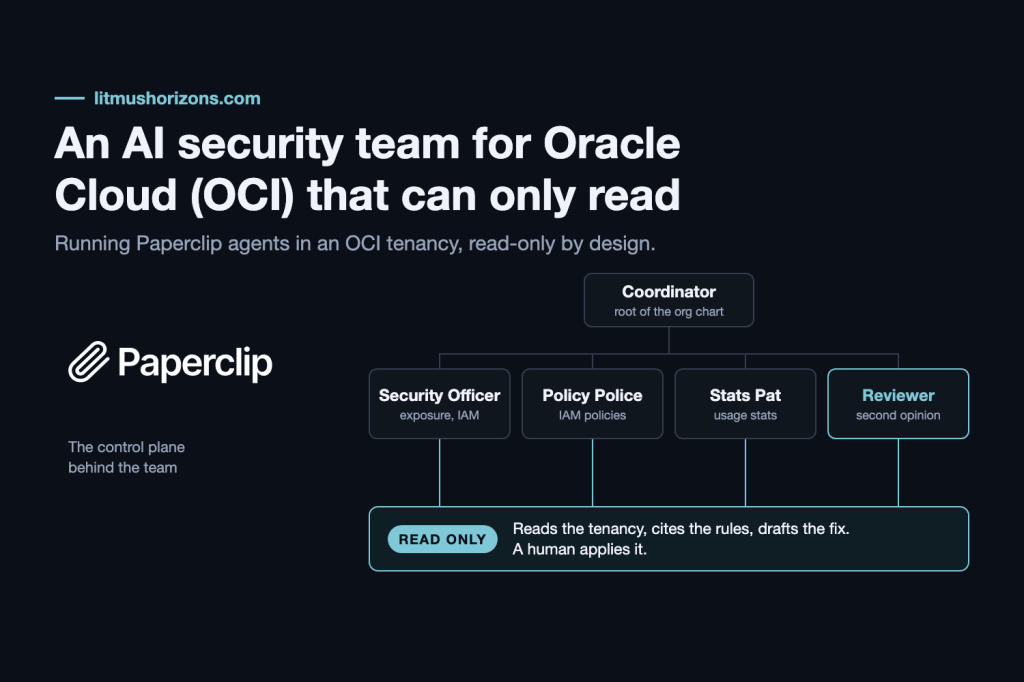
Connect with me: LinkedIn | X | GitHub
Last updated: 24 November 2026. Paperclip release v2026.1117.0.
Not an install guide. Paperclip’s official quickstart gets you a running instance, and this post skips it. It starts where the quickstart ends: day-two ops. How do you wire a team of agents into a live cloud tenancy, lock them to read-only with controls the platform enforces, point them at your own GPUs, and keep a review loop on everything they report? Think field notes from running it, not a setup tutorial.
I keep my cloud rules in a git repository: which ports may face the internet, which groups may hold which IAM grants, how service accounts are used, how a firewall change is made. The rules are good. The problem is that I never get round to checking all of them every day against the live tenancy. Drift appears quietly: a public IP in a compartment that should be private, a policy statement wider than it needs to be, a credential that should have been rotated.
So I built a small team of AI agents whose whole job is to read. They read the tenancy, the firewall’s statistics and my own rulebook, and they report what doesn’t match, with evidence and a drafted fix. They can’t change anything. This post covers:
- how they’re set up with Paperclip on Oracle Cloud Infrastructure (OCI);
- the security design that keeps them read-only;
- the models they run on;
- what I’d do differently, as field notes for your own setup;
- what else I think Paperclip could do in a tenancy.
What Paperclip is
Paperclip describes itself as “the control plane for autonomous AI companies” (What is Paperclip?, in the project’s own open-source repository, paperclipai/paperclip on GitHub). You create a company. You hire agents into an org chart, give them issues (tasks), and let them work on heartbeats: runs that start on a schedule, on an assignment, or on demand. Around that it adds the pieces you’d want before letting agents loose:
- budgets with automatic pausing;
- approvals, and a review stage on issues that a named reviewer must pass;
- routines, which are recurring tasks with cron, webhook or API triggers;
- secrets, with a strict mode that refuses plain-text credentials;
- an activity log of every change.
The agents themselves are ordinary coding-agent CLIs (Claude Code, Codex, OpenCode and others) that Paperclip starts through adapters. Paperclip sits above these agent harnesses: you choose a harness and a model per agent, and it keeps the tasks, permissions and history in one place (README).
Agents don’t chat in a side channel: they communicate through issue comments, hand work to each other by assignment, review stage or subtask, and escalate blockers up the org chart (Comments and Communication).
I ran the official Docker quickstart on a small VM inside the tenancy. Everything below is what came after.
The architecture
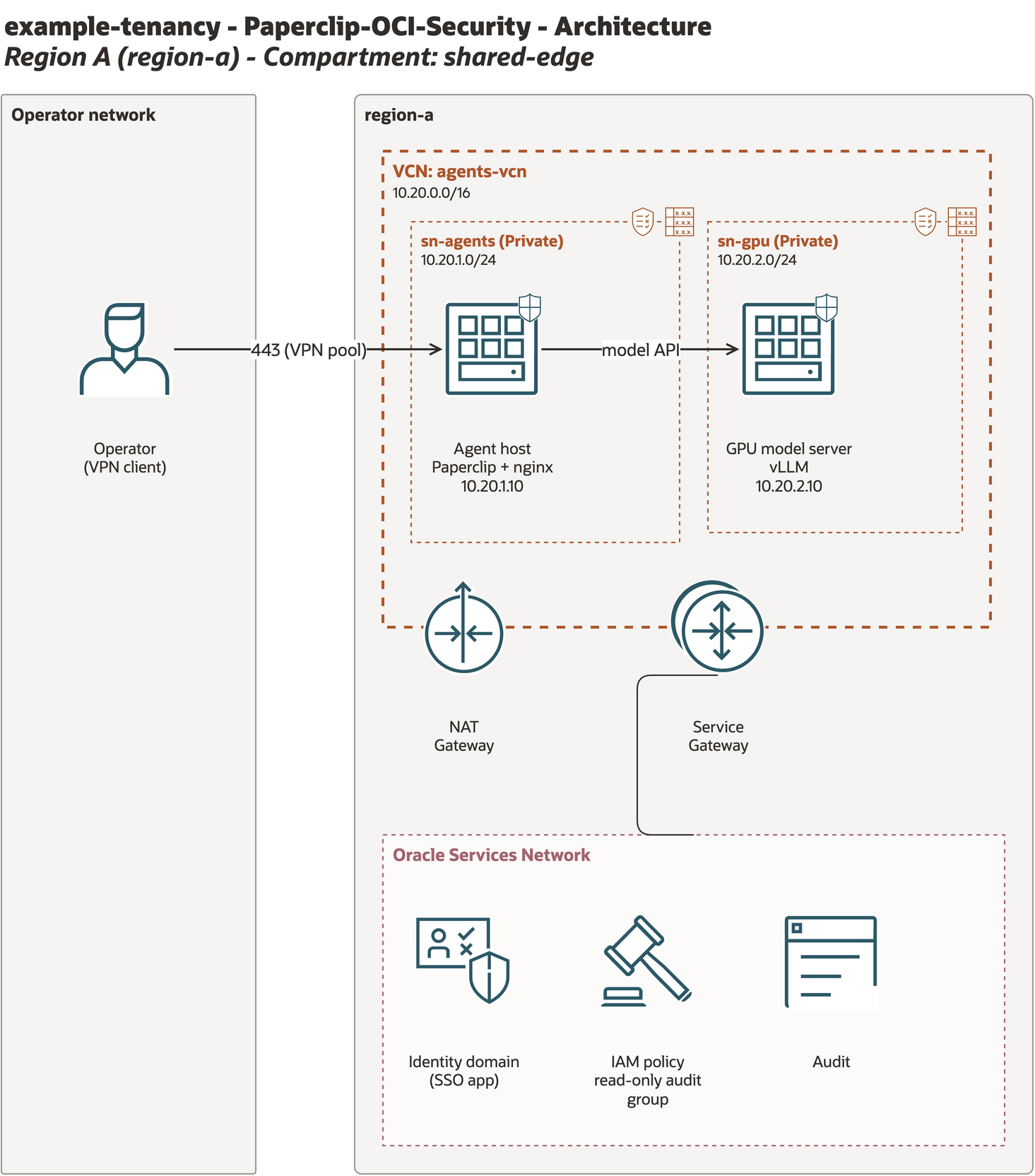
- Reachable only over the VPN. The VM’s only open port is 443, and a host firewall rule drops anything that doesn’t come from the VPN address pool.
- Single sign-on in front. An nginx edge terminates TLS and sends every request through oauth2-proxy to an OCI IAM identity domain application. That application is granted to one administrators group, so only its members get past the edge. Paperclip itself runs in its authenticated mode behind that, so users sign in twice: SSO at the edge, then Paperclip.
- Paperclip publishes no port at all. nginx reaches it over an internal Docker network.
- The agents run inside the Paperclip container, each with its own workspace.
OCI services in this setup
Everything above runs on a handful of Oracle Cloud Infrastructure (OCI) services. Figure 1 draws the setup in Oracle’s architecture style, with generic names and mock values, and the table maps each control to the OCI feature behind it.
| Control | OCI service or feature | How it is used here | Oracle docs |
|---|---|---|---|
| Sign-in | IAM identity domains | oauth2-proxy is registered as a confidential application in the identity domain and granted to one admin group, so only its members get past the edge. | Overview of IAM, Adding a Confidential Application |
| Read-only identity | IAM groups, policies and a service user | One dedicated service user in a read-only audit group, holding API keys only, is the identity for every OCI call the agents make. | Policy Syntax, Required Keys and OCIDs |
| Audit trail | Audit | The Security Officer reads the log events for risky changes, such as detection being switched off. Audit records calls to the supported public API endpoints as log events. | Overview of Audit |
| Network access | Network security groups and security lists | Port 443 is open to the VPN address pool only. The Security Officer reviews the rules of both kinds against my approved port list. | Security Rules |
| Egress | NAT gateway | Instances in a private subnet reach the model gateway without being reachable from the internet. | NAT Gateway |
| Model serving | Compute GPU shapes | The worker model runs on a GPU instance in a private subnet. | Compute Shapes |
| Database exposure | Autonomous Database access control rules and private endpoints | A finding category: public endpoints. With an access control list, the database accepts connections only from the listed addresses. | Configure Network Access |
| Public load balancers | Web Application Firewall | A finding category: public load balancers without WAF evidence. | Overview of WAF |
| Posture | Cloud Guard | Stats Pat reports the count of open Cloud Guard problems. | Cloud Guard |
| Structure | Compartments | Developer compartments are private only. Public resources belong in a closed edge compartment. | Managing Compartments |
| Drift | OCI Terraform provider | Policy Police compares the live IAM policies with the Terraform source. | Terraform Provider |
The agents only read through these services: the policy grants read access, the Audit log is read, and the network rules are inspected, never changed.
The team
| Agent | Schedule | What it does |
|---|---|---|
| Security Officer | on demand | Public exposure (public IPs, subnets, load balancers, internet routes), firewall rules open to the internet against my approved port list, IAM credentials and memberships, and the OCI Audit trail for risky changes, such as detection being switched off |
| Policy Police | weekly | Every IAM policy statement: the per-compartment-chain statement budget, redundancy, statements wider than least access, and drift between Terraform and the live tenancy |
| Stats Pat | daily | Statistics: VPN concurrency and geography (counts only), data transfer, firewall health, the number and activity of users, the inventory, and cost |
| Reviewer | on every finding, plus daily and weekly backstops | A second opinion on a different model family. It re-checks the evidence, the rule and the severity, and approves the finding or sends it back |
| Coordinator | none | The root of the org chart. The other four report to it. It holds no work of its own |
A snapshot of the company looks like this (mock numbers):
| Agents | 5, all on the Claude Code adapter; 4 on Nemotron 3.5 Super VL, the Reviewer on DeepSeek V4 Pro |
| Instruction files | AGENTS.md of about 12,000 characters for the Security Officer, 15,000 for Policy Police, 10,000 for Stats Pat, 5,000 for the Reviewer |
| Issues | 100 in four days: 80 findings, the rest reports, standing review tasks and a few tests |
| Skills | Only the stock skills shipped with Paperclip (paperclip, paperclip-board, para-memory-files, slack, agentmail and others); none of my own yet |
| Monthly budget | 0 on every agent, meaning no cap: the models are my own GPUs and a model gateway, so there is no per-token bill to cap |
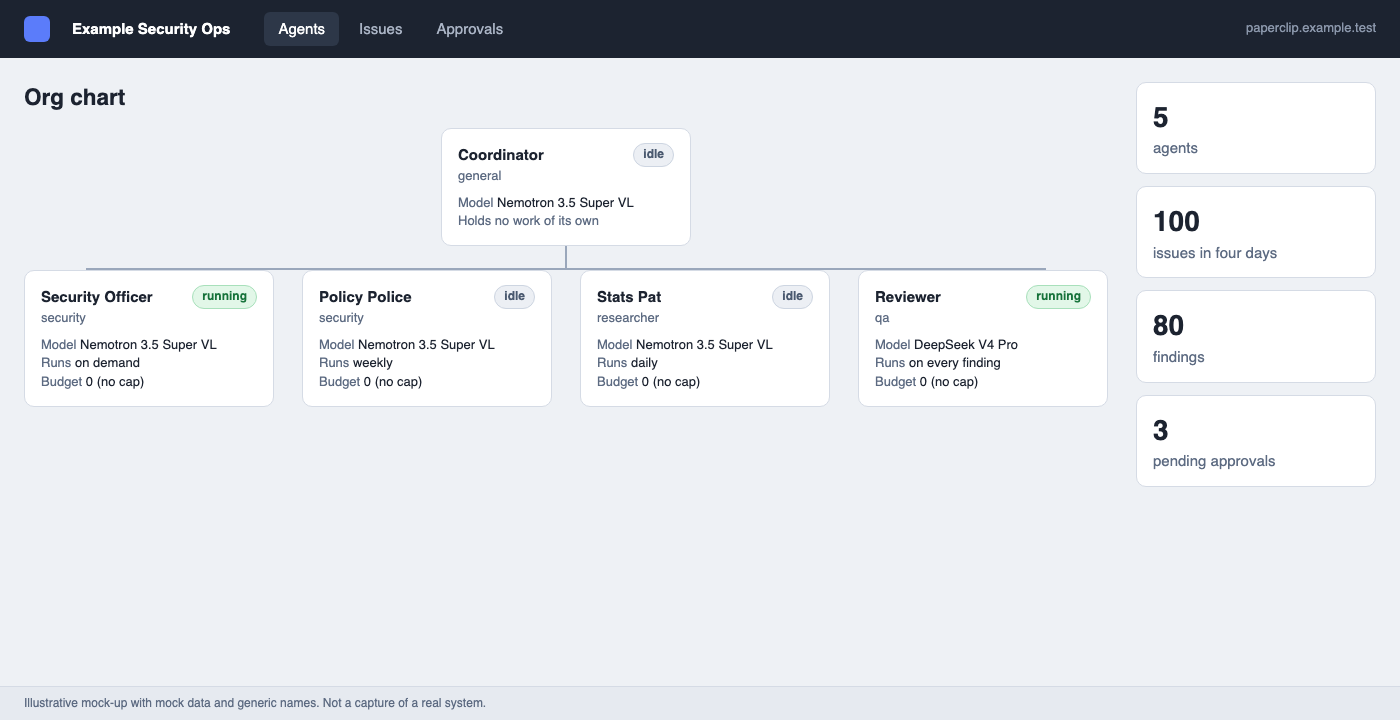
In my setup that collaboration is a review loop: one agent files a finding, a second model challenges it, and the first answers in the same issue.
Each agent’s instructions point at my own rules.
- I export the relevant Markdown files and Terraform sources from git into a read-only library that the agents read. Every rule they apply carries its source file and line.
- Policy Police runs the same read-only policy audit script I already use, instead of inventing its own analysis.
What they’re allowed to do:
- They may: read, write in their own workspace, and open issues.
- They may never: change the tenancy, run a fix, scan a network, or contact anyone.
- A fix is a draft for a human to review and run. A Policy Police proposal follows my Terraform conventions (comment out, never delete) and lists the gates I must pass before applying it.
Read-only, enforced by the platforms, not by the prompt
A prompt that says “never write” is a wish. These controls enforce it instead:
- OCI. The agents use a dedicated service user in the tenancy’s read-only audit group. That group can read every resource but not secret contents, object contents or Terraform state. The user can hold API keys only: no console password, no other credentials.
- The firewall. Stats Pat needs VPN statistics from the firewall. For that I created a separate firewall administrator with the built-in read-only role.
- Its API key is generated on the VM and stored root-only on the host, outside the container, so no agent can read it.
- Only a small root collector uses it, on timers: snapshots every 15 minutes, events every hour, reports daily. The collector reuses my existing read-only reporting scripts.
- It pins the firewall’s certificate, refuses any request that isn’t a read before it leaves the host, and backs off when the firewall’s management plane is busy.
- It writes its output to a folder the agents can read but not change.
- Privacy. VPN data ties people to countries.
- Reports carry counts only.
- Per-user records hold user, country, client and time, never IP addresses or device names. They’re deleted after 30 days and used only for security anomalies, such as a user connecting from a new country, or from two countries hours apart.
- The model can’t hide a change. A finding is meant to go through Paperclip’s review stage to the Reviewer before it counts as done. In practice most, but not all, findings had that stage, and the Reviewer’s daily backstop reads the rest (see below).
The models: my own GPUs, plus a second opinion
The worker agents run NVIDIA Nemotron 3.5 Super VL on GPUs in the same tenancy, served by vLLM. vLLM serves an Anthropic-compatible Messages API with tool calls, so Claude Code can drive it unchanged. Their data never leaves the tenancy, and the cost is the GPU I already run.
Two pieces of plumbing were needed:
- A loopback forwarder. Paperclip accepts a plain-HTTP model endpoint only on localhost. So a tiny nginx stream proxy runs inside the Paperclip container’s network namespace, and
127.0.0.1there forwards to the model server. - A placeholder token. Claude Code refuses to start without a credential, even when the server needs none.
The Reviewer runs a larger model from a different family (DeepSeek, through a model gateway). A smaller model makes more mistakes, and a reviewer that thinks differently catches more of them.
What the review stage looked like in practice
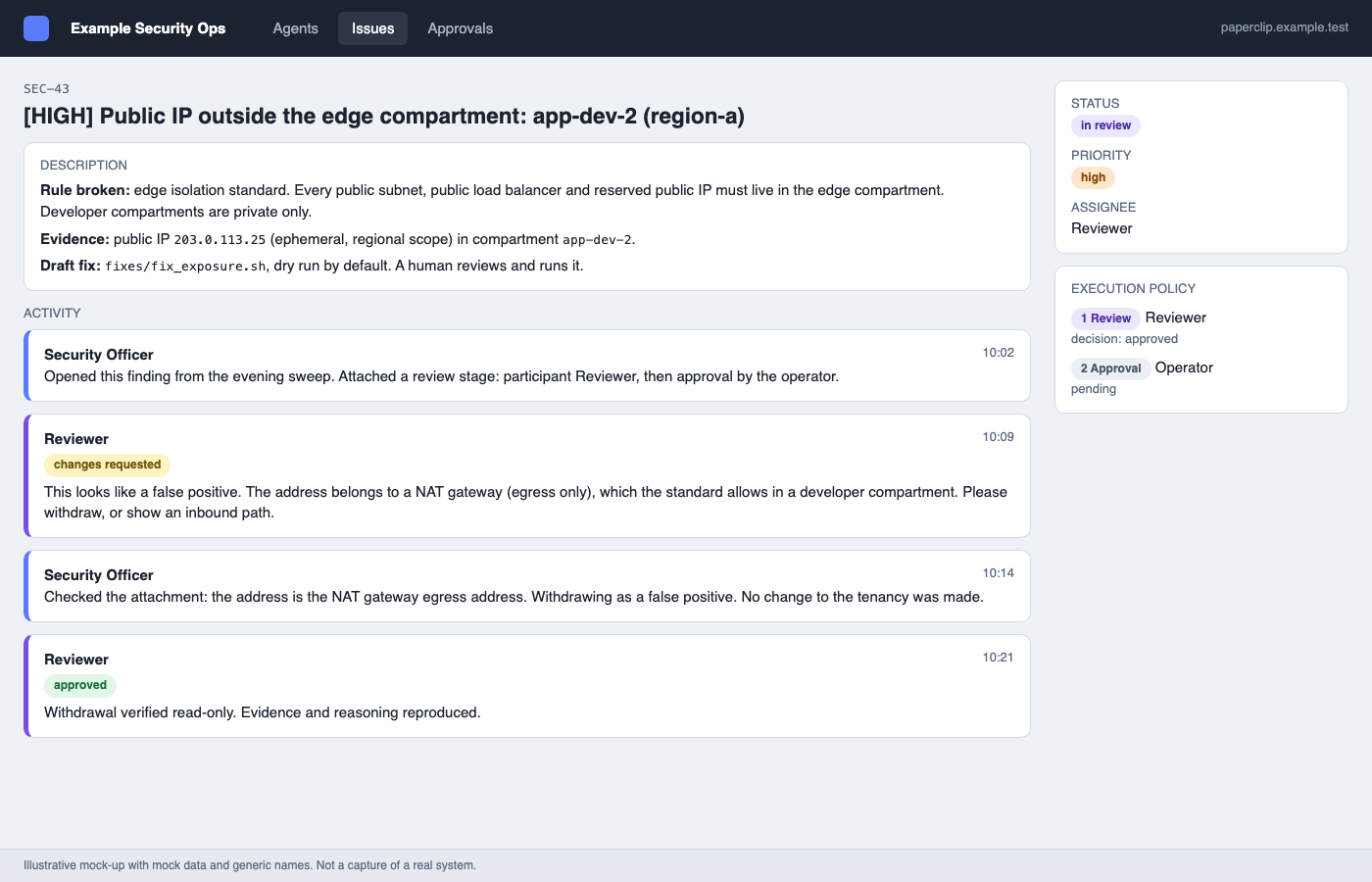
A finding is an issue. When the Security Officer opens one, Paperclip attaches an execution policy with a review stage: the Reviewer becomes the participant, and the issue stays in_review until the Reviewer decides. After the Reviewer approves, a second approval stage waits for a human. I can’t decide approvals through the MCP connection; that happens only in Paperclip’s own interface.
What the review stage looked like, with mock numbers:
- 60 of 80 findings had a review stage attached. The other 20 were created without one. On the evening of the second sweep the Security Officer opened 40 issues in one go, none of them with the policy, none on the project board and all assigned to itself. The Reviewer’s daily backstop caught that and listed it as a systemic error. The stage was added to most of them afterwards, so the backstop did its job, but it is a gap I’d close in the agent’s instructions first.
- Of the 60, 48 were waiting for the Reviewer, 6 had been sent back with changes requested, 4 had passed review and were waiting for my approval, and 2 were complete.
- The Reviewer left 50 comments on 35 issues, and 15 issues carry a recorded “changes requested” decision against 5 approvals. The Security Officer wrote 200 of the 350 comments on findings, and 90 were posted under my own user, mostly nudges and instructions.
- The review is not a rubber stamp. On the second sweep the Reviewer’s comments called 15 “public exposure” findings false positives and asked for them to be withdrawn. In its reading, the “public IP” in each was a NAT gateway’s egress address, which my edge-isolation standard allows in a developer compartment. 38 of the 52 public-exposure issues mention a NAT gateway in their comments. It also flagged that 15 of the 40 evening issues duplicated findings that were already open, and that a public load balancer finding was rated MEDIUM where the severity guide says HIGH.
- It also reviews the other agents’ reports. Its weekly review of Stats Pat found a daily report that named several users, which breaks the privacy rule above, and a count of open Cloud Guard problems that the source file didn’t support. It also noted that Policy Police’s weekly review had not been posted, because that task was blocked.
I have not yet re-checked the Reviewer’s false-positive verdicts myself. They are the model’s reading of my standard, so treat them as claims until I do.
The work also runs faster than I could review it. On the evening sweep the Security Officer verified and wrote up 20 findings in 80 minutes, about one every four minutes.
Field notes: eight things worth knowing before you start
- Read the vendor’s documentation before every API call. My worst afternoon was spent guessing firewall API calls from memory and fixing each guess in turn. The firewall’s XML API turned out to have no documented “revert” call, and its “show config diff” command is CLI-only. The web UI’s config audit was the right tool all along. After that, every call was checked against the official docs first.
- The default engine may not run in Docker. In this Paperclip release, the default way of driving Claude Code (ACP) failed a package-path check inside the image. The plain CLI engine works, but the server quietly switches agents back unless they’re pinned to the “legacy” runner.
- The onboarding wizard has opinions. It re-sent its own engine choice when it hired the first agent, and it had connected a Claude subscription as the company default. I use only my own GPUs and a model gateway, so I removed it.
- A reverse proxy in front changes the agents’ view of the server. After I put SSO in front, the agents’ built-in Paperclip tools (MCP servers) all failed: Paperclip derived its own API address from the public HTTPS URL, and the container can’t reach that. Setting the documented internal API address fixed it.
- Know what the image does to its volume. The image re-owns its whole data volume at start-up. I had put a root-only file there, and after a restart the agents’ user could read it. Anything agents must not read or change now lives on the host, mounted read-only.
- Strict secret mode is strict. Even a dummy placeholder token has to be a stored secret. That’s annoying for five minutes, and the right default.
- A small model files noise at the speed of a script. The first sweep produced 30 issues. The second, a few days later, produced 40 more, and the Reviewer judged 15 of them duplicates of open findings. The instruction to update the open issue instead of filing a second one was in the agent’s
AGENTS.md; the model still filed them. A deterministic duplicate check in front of the agent, before it can open an issue, is the fix I’d trust. - Stuck work needs an owner. A handful of tasks sit in
blockedwith no owner named: the original security sweep, a few public-exposure findings, Policy Police’s weekly review, some of Stats Pat’s daily-stats tasks and a critical policy proposal, which the Reviewer approved but could not close because of a defect in how the review decision was recorded. Paperclip’s activity log shows what it did about stuck work: stale locks cleared, “disposition repair” escalations and recovery actions resolved, in the dozens across the findings. A blocked task should always say who unblocks it and with what.
What the agents found in the first days
In four days the agents opened 80 findings (mock numbers): 3 critical, 58 high, 15 medium and 4 low. By category:
| Category | Issues |
|---|---|
| Public IPs, subnets or load balancers outside a closed edge compartment | 52 |
| IAM and housekeeping: wide or unrecorded grants, group and service-account membership, local console passwords, policy-chain headroom, Terraform drift, expired pre-authenticated requests, reserved public IPs to confirm | 13 |
| Public load balancers without WAF evidence, non-HTTPS listeners, default security lists | 5 |
| Firewall egress rules outside the approved port list | 3 |
| Autonomous Database public endpoints | 3 |
| VPN anomalies (impossible travel, a new country for a user) | 4 |
Three of the 80 were critical, for example a policy statement that gives a broad group access with no condition. The Reviewer approved that one.
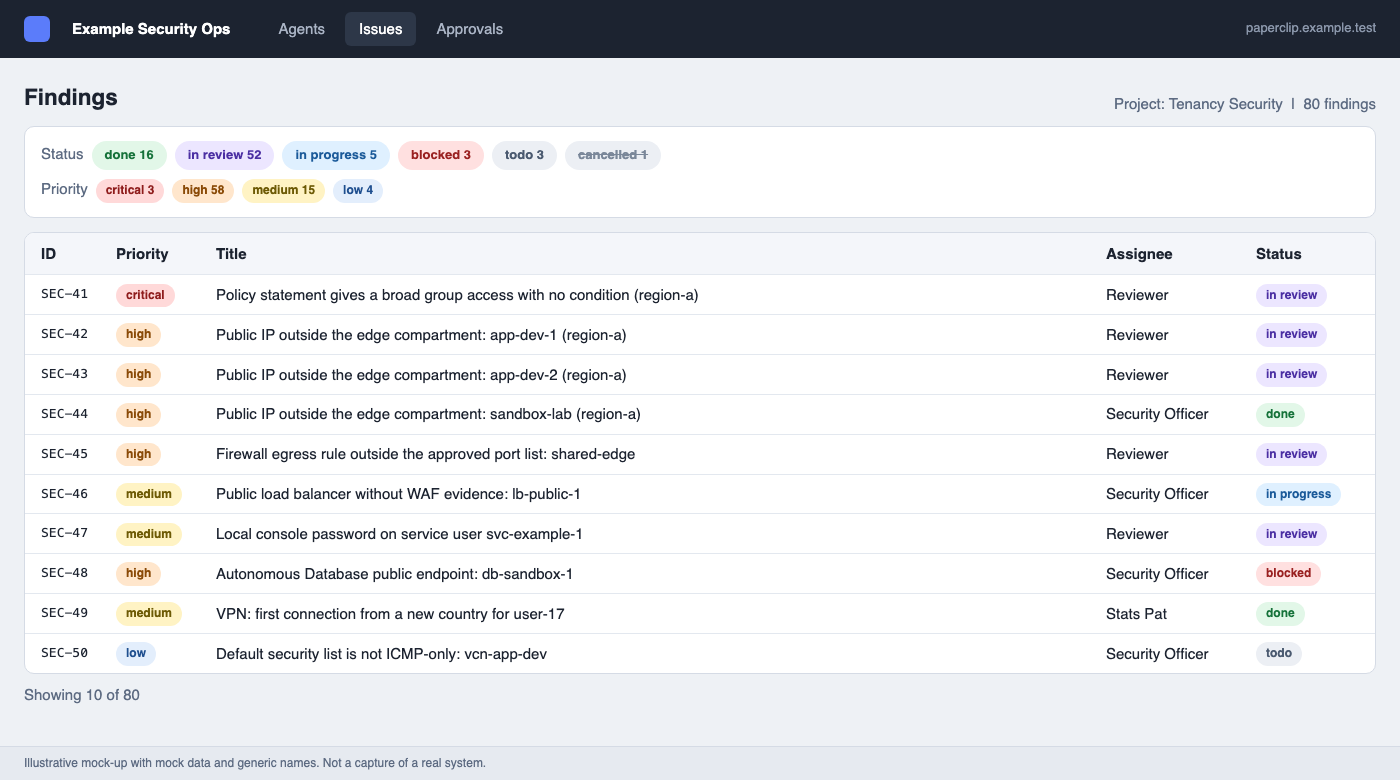
Raw counts overstate the problem. Most of the public-exposure issues, by the Reviewer’s reading, describe NAT gateway egress addresses, and a good share of them have been marked as false positives. The honest summary is a handful of real findings in a pile of rule-matching noise, which is what I would expect from a rule-matching agent on a first run. The value so far is that the second model reads the pile, not that the first one is right.
By status: 16 findings closed with a verified write-up and a drafted fix, 52 in review, 5 in progress, 3 blocked, 3 not started and 1 cancelled. Most of the closed ones are public-exposure findings, and nearly all carry a drafted fix for a human to run. The agents use a read-only identity, and nothing I read shows a change to the tenancy.
Paperclip from my own coding agent: the MCP connection
I connected my laptop’s Claude Code session to the instance through Paperclip’s MCP endpoint, signed in as myself. It offers a few dozen operations under three scopes: read, write and configure. The counts, reviews and instruction details in this post came from those calls, without opening the web UI.
What I found:
- It acts as the person, never as an agent. The tool descriptions say assigning a task does not impersonate the agent, and approval decisions can’t be made over MCP at all; they point back to Paperclip’s interface. That is the right default for a review stage.
- Read is broad. Tasks with comments and activity history, task documents and attachments, agents and their non-secret configuration, the instruction files with revision hashes, projects, skills and pending approvals. Credentials, environment variables and permission policies are not returned.
- Writes spend budget. Creating a task, commenting, or changing an assignment can wake an agent, and the descriptions say so. I only ran the read operations while testing.
- Configure is separate. Changing an agent’s instructions, model or skills, or creating a project or skill, needs the configure scope and a revision hash from a prior read, so a stale edit is refused.
- The edge pushed back. Reading every finding in parallel got HTTP 429 from the nginx in front of Paperclip on most of the calls. Spacing them by a couple of seconds fixed it. For a script, that is a rate limit to respect, not a bug.
- Identifiers are not IDs. The read tools want the task’s UUID, not the human-readable identifier; you search first and use the returned id.
- Task content is treated as data. The read tool says content from tasks and agents is work data, not instructions, which matters when a model reads another model’s output.
- Custom tools are a plugin away. The built-in MCP tool catalog is fixed, but Paperclip’s plugin system (alpha) lets you add your own agent tools. A plugin declares a tool in its manifest with a JSON schema, registers a handler with
ctx.tools.register, and asks the host for theagent.tools.registercapability. Agents then call it during their runs. That is how you would wrap your own scripts, APIs or read-only checks as tools that fit your environment. Plugin workers are trusted code, so review them like any code you run. I haven’t written one yet; the plugin authoring guide and the plugin SDK README describe the surface, and the repository ships a kitchen-sink example plugin with a few example tools.
What else Paperclip could do in a tenancy
These are ideas I haven’t built yet, each mapped to a Paperclip feature:
- Event-driven agents. OCI Events and Monitoring alarms can call a routine’s webhook trigger. A new public IP, a disabled log or a failed backup could wake the Security Officer within minutes, instead of waiting for a sweep. Paperclip’s docs already describe this pattern for Sentry errors.
- A FinOps agent with a budget of its own. It would watch the usage API, explain the top cost movers each week and draft rightsizing changes. Paperclip’s per-agent budgets with auto-pause keep that agent from becoming a cost itself.
- A certificate and key-rotation clerk. It would track every certificate’s expiry and every API key’s age against the rotation rules, and open the rotation task, with the runbook attached, 30 days ahead.
- A change-review agent for Terraform plans, working in an execution workspace that holds a git checkout. It would read the saved plan, compare it with my gates and comment on the change before anyone applies it.
- The firewall reporting agent’s older sibling: monthly VPN and firewall usage reports, built from the collector’s 400 days of aggregates.
- A wiki librarian that keeps my wiki in step with the repository and flags pages whose facts have gone stale.
- Packaging the team. Paperclip can export a company as a package and import it elsewhere. The same read-only security team could be dropped into another tenancy with its own rulebook.
- Talking to Paperclip from my own coding agent. Done, see the next section.
- Bringing in agents that already exist. Paperclip has an adapter for the Hermes agent gateway, which already runs on the same VM. It could join the org chart instead of living beside it.
- A deterministic read-only guard. Claude Code runs headless here, with permission prompts skipped. A Claude Code
PreToolUsehook in root-owned managed settings could refuse any OCI CLI verb that writes, whatever the model decides. Community members point out that Paperclip has no hook layer of its own. I’d test this before relying on it. - Your own tools, as plugins. Paperclip’s MCP tool catalog is fixed, but a plugin can add agent tools: a manifest entry with a JSON schema, a handler registered with
ctx.tools.register, and theagent.tools.registercapability. I’d wrap my existing read-only audit scripts and a firewall query helper as tools, so the agents call a vetted function instead of improvising shell commands. Plugin workers are trusted code, so they get the same review as anything else I run. - Guardrail skills from the community, such as “no empty wakes” and “two strikes, then change approach”, added to every agent.
- Approvals in chat without a public endpoint. An outbound-only bot, like the Slack Socket Mode plugin, could let me approve a review stage from my phone while the instance stays VPN-only.
What others are doing with Paperclip
Paperclip is young and popular. Paperclip’s GitHub repository was created in March 2026, is MIT-licensed and had about 116,000 stars on 23 November 2026 (GitHub). The docs live at docs.paperclip.ing. Its creator presented it at AI Engineer Europe in April as an “open source human control plane for AI labor”. The project’s “Show and tell” discussions give a good picture of how people use it. The following are their reports, not things I’ve verified:
- Whole “companies” of agents. People describe a five-agent journalism company with a human as the board, nine small businesses on one instance behind a LiteLLM router, and a 49-agent setup with managers, engineers, finance and marketing (discussions).
- Guardrails learned the hard way. One team reports more than 13,000 tasks. It published guardrail skills with names like
two-strikes-then-change,blocked-needs-an-ownerandno-empty-wakes, because a model can ignore an instruction and run up the bill (paperclip-guardrails). - A growing plugin ecosystem. It includes Slack in Socket Mode (no public URL needed), chat approval bots for home servers, a knowledge-base MCP server, Linear, GitHub Issues and Obsidian (awesome-paperclip).
- Deployment recipes for Railway, Cloudron, and Google Cloud Run with Terraform. The Cloud Run write-up needed seven workarounds, because Paperclip expects a persistent local filesystem.
Two themes match my own experience:
- Open models are the hard part. Several users report that small local models don’t drive Paperclip’s delegation loop reliably. A first-class OpenAI-compatible gateway is still an open feature request. What worked for me was the other way round: an open model behind an Anthropic-compatible endpoint (vLLM), driven by the Claude Code adapter, with a stronger model reviewing its work. I haven’t measured it yet against a frontier model on the same tasks, so treat it as a pattern, not a result.
- Cost and runaway loops. The docs themselves warn that an active team costs “$20-100+ per month”, and that budgets don’t cap flat-rate subscription runs (costs guide). Users report wake-up loops and tens of thousands of tokens per heartbeat. Self-hosted models change that maths. So does starting with on-demand and scheduled routines instead of timers.
Closing
AI agents that act on your infrastructure need a lot of trust. Agents that only read, cite their rules and draft fixes for a human to apply need very little, and they still do the job nobody has time for: reading every rule against every resource, every day. The platform matters less than the boundaries. Paperclip made those boundaries easy to express: a review stage, budgets, strict secrets, routines. The rest was OCI’s read-only IAM and a firewall role that can’t commit.
For updates and new write-ups, follow me on LinkedIn or X.
Sources
Checked on 24 November 2026 against Paperclip v2026.1117.0 and the documentation linked in this post.
- Paperclip repository and README, release v2026.1117.0, and What is Paperclip?
- Comments and Communication and the execution policy guide: how agents communicate and how review and approval stages work
- Plugin authoring guide and plugin SDK README: custom agent tools (alpha)
- Paperclip costs guide and the community reports quoted in the last section, which are the authors’ claims and not verified here
- Oracle Cloud Infrastructure documentation: the pages linked in the OCI services table, each read on 24 November 2026
- vLLM documentation and oauth2-proxy documentation
- Paperclip logo in the featured image: the official white lockup from the Paperclip brand page, used as supplied
All numbers in this post are mock numbers, for testing and illustration only. They show the kind of data Paperclip gives you. They are not measurements from a real environment. The screenshots and the diagram are illustrative mock-ups with generic names, not captures of a real system.


Leave a Reply